Wordpress
What is a Page Builder in WordPress?
Page builder in WordPress: Learn how this powerful tool empowers you to design stunning web pages without any coding knowledge.
Est: 5 min
Updated: June 29, 2023

What is a Page Builder in WordPress? A page builder is a plugin or tool that allows users to create and design web pages in WordPress visually. Instead of relying on complex code, page builders provide an intuitive drag-and-drop interface, enabling users to arrange elements, customize layouts, and style their websites with ease.
WordPress is a popular platform for building websites and blogs, known for its flexibility and user-friendly interface. When it comes to designing and customizing web pages in WordPress, page builders are powerful tools that can enhance the visual editing experience. In this article, we’ll explore the world of WordPress page builders and answer common questions related to their usage.
WordPress itself does not come with a built-in page builder. However, there are numerous page builder plugins available in the WordPress ecosystem that can be installed and used to create stunning layouts and designs without any coding knowledge.
There are several excellent free page builders available for WordPress. Some popular choices include Elementor, Beaver Builder, and SiteOrigin Page Builder. These page builders offer a wide range of features, templates, and customization options to help you create professional-looking websites without spending a dime.
As of WordPress 6.2, the default page editor is called the Gutenberg editor. It introduces block-based editing, allowing users to create content using pre-designed blocks for various elements such as paragraphs, headings, images, and more. While Gutenberg is a significant improvement over the classic editor, it is not as robust as dedicated page builders in terms of design flexibility and advanced features.

The impact of page builders on website speed can vary depending on factors such as the specific page builder used, the complexity of the design, and the overall performance optimization of the website. While some page builders may add a slight overhead, reputable ones like Elementor are known for their optimized code and performance enhancements, ensuring minimal impact on website speed.

Elementor is one of the most popular page builders for WordPress, and for good reason. It offers a user-friendly interface, a vast library of pre-designed templates, and extensive customization options. With its intuitive drag-and-drop functionality, real-time editing, and responsive design capabilities, Elementor empowers users to create visually stunning websites without the need for coding skills.

While page builders can be incredibly beneficial for non-technical users, there are a few reasons why some developers and professionals prefer not to use them. One concern is the potential for bloated code and excessive reliance on plugins, which can impact website performance and maintenance. Additionally, some advanced customization and intricate design requirements may be better suited for custom coding or working directly with themes.
The primary difference between using a page builder and coding is the level of technical expertise required. Page builders provide a visual, code-free approach to website design, allowing users to create and modify layouts through an intuitive interface. On the other hand, coding involves manually writing and manipulating HTML, CSS, and PHP code to achieve the desired design and functionality. Coding offers more flexibility and control but requires a higher skill level.
A WordPress page builder is a plugin that allows users to create and customize the layout and design of individual pages on their website. It provides a visual, drag-and-drop interface, eliminating the need for coding knowledge. With a page builder, you can choose from pre-designed modules, templates, and styling options to construct unique page layouts. It focuses on enhancing the content and structure of individual pages, allowing you to have full control over the design without touching the code.
A WordPress theme builder, on the other hand, enables users to customize the overall appearance and functionality of their entire WordPress theme. It allows you to modify and design global elements like headers, footers, sidebars, and other theme components. With a theme builder, you have advanced customization options to create a consistent design throughout your website. It focuses on customizing the global elements of your theme rather than individual pages.
The main difference between a WordPress page builder and a theme builder lies in their scope of customization. A page builder is primarily concerned with designing and customizing the content and layout of individual pages, while a theme builder focuses on customizing the global elements and overall appearance of your website.
Page builders allow you to visually create and modify page elements such as headings, images, buttons, and columns. They are ideal for users who want to have control over the design of each individual page without dealing with code.
Theme builders, on the other hand, provide more extensive customization options for global elements like headers, footers, and sidebars. They offer advanced styling and layout customization capabilities, allowing you to create a consistent design across all pages of your website.
In summary, page builders are best suited for designing and customizing individual pages, while theme builders are geared towards customizing the global elements of your website’s theme. Both tools can be used together to achieve a highly personalized and visually appealing website.
Understanding the differences between WordPress page builders and theme builders is crucial for making informed decisions about designing and customizing your WordPress website. Page builders are ideal for designing and customizing individual pages, while theme builders provide extensive customization options for global elements. By utilizing both tools effectively, you can create a visually stunning website that meets your specific design requirements and engages your audience.
Breakdance is the ultimate website builder plugin for WordPress, offering a wide range of benefits and features to simplify the website creation process. With its intuitive drag-and-drop interface, versatile templates, and responsive design capabilities, Breakdance empowers users to build visually appealing and functional websites without the need for coding skills.
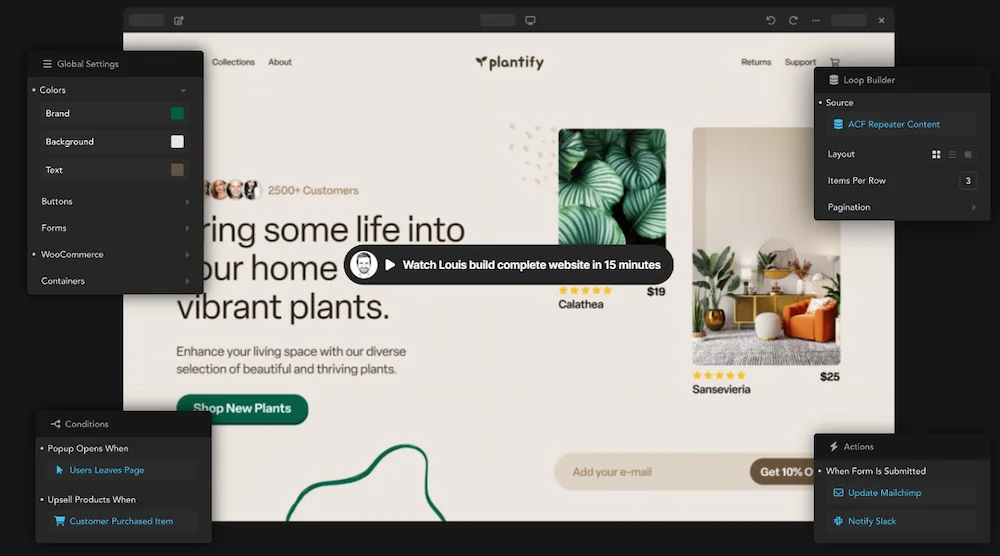
Checkout Breakdance page builder website
By choosing Breakdance, you gain access to powerful features that enhance your website’s performance, such as seamless WordPress integration, fast loading speeds, and optimization for mobile devices. The plugin also provides excellent customer support to assist you throughout your website-building journey.
Furthermore, Breakdance offers flexible pricing plans tailored to different needs, ensuring that individuals, small businesses, and large agencies can find a suitable option within their budget.
Don’t settle for a mediocre website when you can unlock your creative potential and elevate your online presence with Breakdance. Start building your dream website today and experience the transformation of your WordPress site into a stunning masterpiece.
Yes, many WordPress page builders are available for free. Popular options like Elementor, Beaver Builder, and Site Origin Page Builder offer robust features and functionality without requiring any payment. However, keep in mind that some page builders also offer premium versions with additional features and support that may require a paid subscription.